


Hurdlr: Mileage, Expense & Tax
4.24.76K Reviews
App Specs
- Version
- 42.2.5
- Updated On
- License
- Free
- Downloads
- 100,000+
- Developer
- Hurdlr, Inc.
- Categories
- Finance
- Platform
- Android
Screenshots
 Analysis by AppCompare
Ever find yourself buried under a pile of receipts, struggling to remember every mile you drove for work, or just plain lost when it comes to taxes? Yeah, been there. That’s where Hurdlr comes to the rescue. This app promises to make all those financial headaches disappear, and after giving it a whirl, I’ve got some thoughts to share.
Who can make the most of it?
I’d look at Hurdlr first if your work puts you in a car regularly and your income or expenses are spread across jobs, clients, or projects. A delivery driver, consultant who visits clients, and freelance worker with a mix of home and on-site work all face the same annoying task: recording business activity while it is still fresh. A dedicated tracker can make that routine easier to maintain than trying to reconstruct it from a calendar months later.
It is less compelling if you only drive occasionally for work, have very few expenses, or already keep tidy records in a system you trust. In those cases, the time saved may not justify adding another place to check. I’d also avoid treating a tax estimate as a substitute for professional advice when your income or filing situation is complicated. The app can help organize information, but I’d still review the underlying records before making tax decisions.
A realistic week with mileage and expenses
Picture a self-employed photographer who drives to a morning client, buys a small work supply on the way back, and then spends the afternoon editing at home. The useful part is not simply having a trip recorded; it is being able to decide promptly whether that trip was business-related and keep the receipt connected to the expense while the reason is still obvious. If that photographer waits until the end of the month, a stop that felt clear on the day can become hard to classify accurately.
My practical advice is to build a brief review into the end of each workday. Check any trips that need a business or personal classification, add context to unusual purchases, and make sure a receipt image is readable. That small habit is more valuable than expecting automation to understand every edge case. A commute, a mixed-purpose trip, or a purchase used partly for work may need a considered decision rather than a quick assumption.
How it differs from a spreadsheet or a general finance app
A spreadsheet gives you flexibility and costs nothing to adapt, but it depends on you remembering to enter mileage and expenses consistently. A general budgeting app may help you understand household spending, yet it is not necessarily arranged around work trips, receipts, and tax deductions. Hurdlr’s appeal is that it brings those self-employed bookkeeping chores into one workflow rather than asking you to piece together a mileage log, a folder of receipt photos, and a separate tax estimate.
That focus has a trade-off: it is not automatically the best choice for every kind of money management. Someone who needs formal bookkeeping, detailed invoicing, inventory records, or a full accounting workflow should compare it with software built for those needs. I would treat Hurdlr as a practical organizer for independent work, not as proof that every accounting task has been handled. Keeping an export or backup of important records is sensible regardless of which app you use.
Worth Reading Before You Choose

EA SPORTS FC Mobile 26 Is a Bigger Football Game, but It Takes Time

Flipboard Shows What News Apps Must Do Beyond the Feed

Switching to Android Auto Means Rethinking Your Driving Routine

Google Calendar Makes a Crowded Week Easier to Manage

Ludo King Makes the Most of the Minutes Between Plans

Baby Panda World Brings Quick Play to Modern Phones, but Its Game Library Feels Busy
Small habits that make the tracking more useful
Automatic mileage capture can reduce the burden of logging trips, but it does not remove the need to review them. I would classify drives regularly instead of leaving a large backlog, especially when a day includes both personal errands and work visits. The longer the delay, the easier it is to forget why a route happened. For expenses, photographing a receipt soon after a purchase and adding a short note for anything ambiguous can make later review much less frustrating.
It also helps to separate “recorded” from “deductible” in your mind. A captured expense is useful evidence for your bookkeeping, but whether it qualifies for a deduction depends on the circumstances and applicable tax rules. Likewise, a tax estimate is a planning aid, not a final bill. I’d use the app to spot what needs attention and keep a habit of checking totals before setting aside money or filing.
One question worth asking before relying on it is whether you are comfortable keeping work records in a phone-based workflow. If you prefer to do all bookkeeping at a desk, or want a system designed around an accountant’s review process, a desktop accounting tool may fit better. If you need a straightforward way to record driving and day-to-day costs as they happen, keeping the process on your phone may be precisely the point.
What’s Hurdlr All About?
In a nutshell, Hurdlr is designed to be your all-in-one financial buddy. It tracks mileage, expenses, and even helps you with taxes. Whether you’re a freelancer, a small business owner, or someone juggling multiple gigs, this app aims to simplify your financial life. Hurdlr, made by Hurdlr, Inc., is a finance app that has been around since Aug 6, 2015. Its current version is 42.2.5, and it requires Android 9 or later. The app is free to download, with in-app purchases ranging from $5.99 to $99.99 per item; those purchase options mean I’d check what is included before committing to a paid tier.
Getting Started
Setting up Hurdlr was a breeze. After downloading the app, you’re guided through a straightforward setup process. You input your basic financial details, and boom, you’re ready to start tracking. The interface is clean and intuitive, which means you won't need a degree in accounting to navigate it. Because the app deals with financial records, I’d take a moment during setup to make sure your work and personal activity are clearly distinguished. A little care at the beginning can prevent confusing records later, particularly if you earn money from more than one kind of gig.
Mileage Tracking Magic
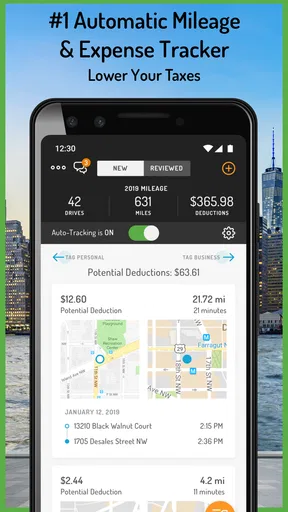
Let’s talk mileage. If you drive for work, you know how crucial it is to keep track of every mile. Hurdlr automatically logs your trips using GPS. You just need to categorize them with a quick swipe. I found this feature super handy, and it saves a ton of time compared to manual tracking. Plus, it ensures you don’t miss out on any deductions come tax time. The important trade-off is that GPS capture still needs your attention: review the trip list and correct classifications rather than assuming every recorded journey was business travel. That is especially useful when one route includes both a client visit and a personal stop.
Expense Tracking Made Easy
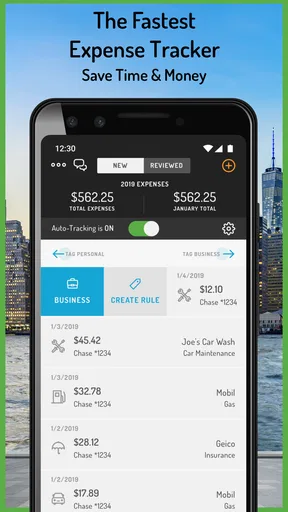
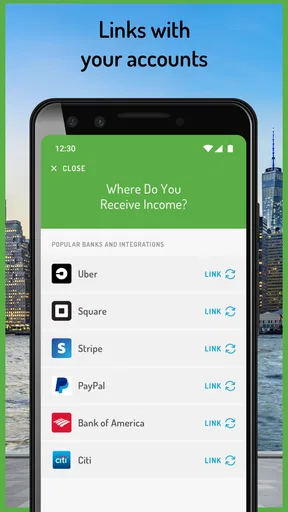
Receipts piling up? Hurdlr allows you to snap photos of your receipts and categorize expenses on the fly. You can also link your bank account for seamless tracking. The app does a great job of organizing everything, so you can see where your money is going at a glance. No more sifting through a shoebox of receipts! Linking an account can save manual entry, while taking a moment to check imported activity helps catch expenses that need a clearer business purpose. If you would rather not connect an account, receipt capture and manual organization can still be useful, though they ask you to be more consistent.
Tax Help You Didn’t Know You Needed
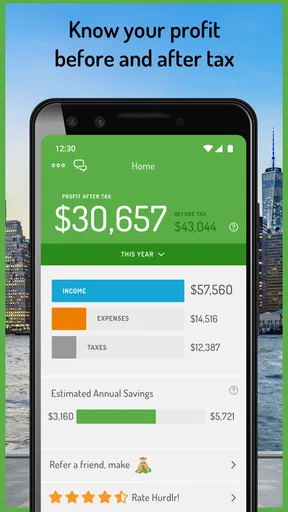
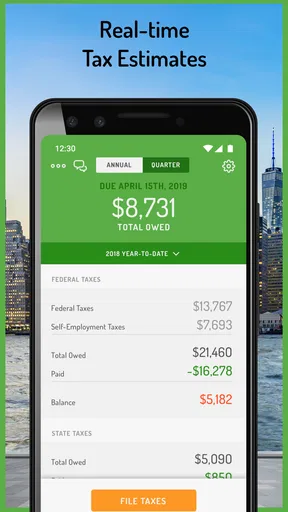
Taxes can be a nightmare, but Hurdlr aims to take the stress out of tax season. It estimates your tax deductions and quarterly taxes in real-time. This feature is a game-changer, especially if you’re self-employed and need to make accurate quarterly payments. Knowing what you owe ahead of time can really help with budgeting throughout the year. I’d use those figures to plan and set money aside, then verify them against your actual income, expenses, and tax circumstances before paying or filing. The estimate is most helpful when your records are current; incomplete mileage or uncategorized purchases can make any running picture less useful.
Some Little Extras
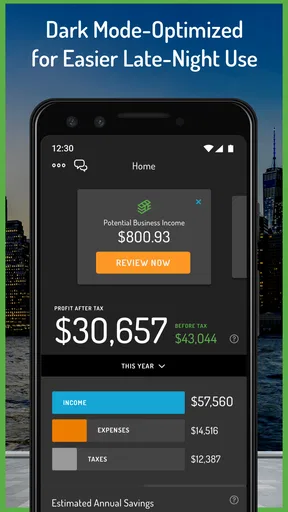
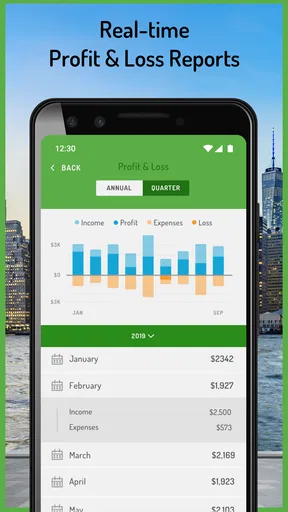
Hurdlr also offers some neat extras like income tracking and financial reports. You can generate detailed reports to get a better overview of your financial health. It's like having a financial advisor in your pocket without the hefty fees. Reports are most valuable when you keep the underlying entries tidy, so I’d use them as a regular check-in rather than waiting until tax season to look. They can help you notice missing records or an expense category that deserves a second look, but they are not a replacement for tailored financial advice.
Also, the customer support is top-notch. Any questions or issues? The support team is responsive and helpful, which is always a plus in my book.
My Final Take
All in all, Hurdlr delivers on its promise to simplify financial management. It’s perfect for anyone who needs to keep tabs on mileage, expenses, and taxes without the hassle. The app is user-friendly, efficient, and offers features that genuinely make a difference. Its audience response is encouraging: it has a 4.3 average from around 9,000 ratings, with more than 100,000 installs, and its content rating is Everyone. Those figures suggest broad interest, but they cannot tell you whether the workflow fits your particular business or whether a paid option is worthwhile for you.
If you’re tired of drowning in paperwork and want to stay on top of your finances, give Hurdlr a try. It might just be the financial lifesaver you’ve been looking for. I’d start with the free access, establish a routine for reviewing trips and receipts, and only consider an in-app purchase if you can point to a specific need it addresses. If you have only occasional work expenses, prefer manual records, or need full-scale accounting, another approach may suit you better. For independent workers who regularly drive and want mileage, receipts, and tax planning close at hand, it is a sensible place to start.
Pros
- User-friendly interface for easy navigation.
- Automatic tracking saves time and effort.
- Integrates with major accounting software.
- Real-time tax estimates for better planning.
- Customizable reports enhance financial insights.
Cons
- Free version has limited features.
- Occasional syncing issues with bank accounts.
- Some features require a stable internet.
- Limited customer support on weekends.
- May be complex for non-business users.
FAQs for Hurdlr: Mileage, Expense & Tax
What is Hurdlr and how can it help me?
Hurdlr is a comprehensive app designed to track mileage, manage expenses, and handle taxes, making it invaluable for freelancers, independent contractors, and small business owners. By automatically logging your travel and expenses, it simplifies financial management and ensures you maximize tax deductions, saving you time and money.
Is Hurdlr compatible with both Android and iOS devices?
Yes, Hurdlr is available for both Android and iOS platforms. Users can download the app from the Google Play Store or Apple App Store, ensuring seamless integration across devices. This cross-platform compatibility allows you to keep track of your finances no matter which device you use.
Does Hurdlr automatically track mileage and expenses?
Hurdlr offers automatic mileage tracking using GPS technology, which ensures every mile is accurately logged without manual input. Additionally, the app can link to your bank accounts and credit cards to automatically import and categorize expenses, making financial tracking both efficient and effortless.
How secure is my financial data with Hurdlr?
Hurdlr prioritizes user security by employing bank-grade encryption to protect your financial data. It ensures that all personal and financial information is securely stored and only accessible to you. This commitment to security provides peace of mind when managing sensitive financial details.
Can Hurdlr assist with tax calculations and filings?
Yes, Hurdlr is equipped to help with tax calculations by providing real-time tax estimates based on your income and expenses. It ensures you're prepared for tax season by highlighting potential deductions and generating tax reports, making the filing process easier and more accurate.


